Choosing the best Cnc Controller is a practical decision, not a simple shopping exercise. The controller must match your machine’s motors, drives, feedback devices, and operating system. It also influences cutting accuracy, cycle time, surface quality, and operator safety. A powerful unit may still perform poorly when its software conflicts with an older servo drive. Compatibility matters most.
Small details can decide the result. Check the available input and output ports. Confirm support for stepper or servo motors. Review maximum axis speed, interpolation performance, memory, and communication protocols. A workshop producing aluminum brackets may need different features from one machining hardened steel molds. Consider the control panel, screen visibility, emergency functions, and daily programming workflow. Operators should not need excessive menus for routine tasks.
Ease of maintenance matters.
Reliable technical support can prevent costly downtime. Ask whether the supplier provides manuals, wiring diagrams, firmware updates, training, and replacement parts. A controller with a lower purchase price may create higher costs through difficult setup or unavailable support. Experienced technicians also inspect electrical noise protection, cabinet space, cooling, and backup procedures before installation.
No checklist is flawless. Real machines often reveal unexpected limits after commissioning. Therefore, request a demonstration, test representative programs, and compare results under realistic cutting conditions. This guide explains how to evaluate a Cnc Controller with practical criteria, technical judgment, and honest attention to trade-offs. The best choice is not always the newest model. It is the one that works reliably with your machine, team, materials, and long-term production goals.
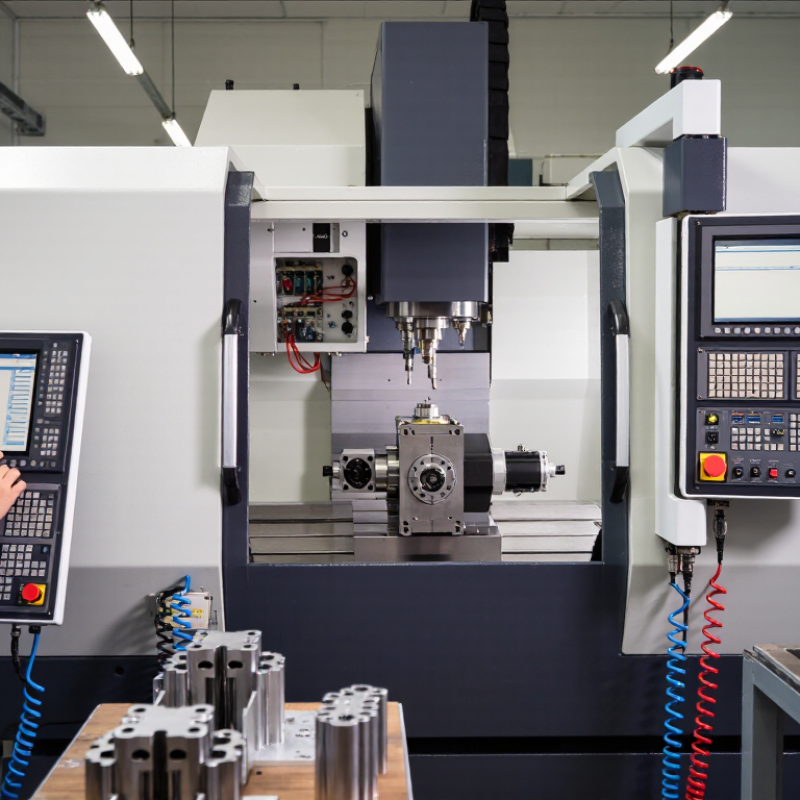
Choosing a CNC controller starts with the machine, not the screen.
Define axis count, travel limits, spindle speed, servo feedback, encoder resolution, and available I/O. A compact three-axis router may need reliable interpolation and probing, while a five-axis machining center demands synchronized motion, tool-center-point control, and strong error handling. Check communication protocols before purchase. An elegant controller becomes expensive if it cannot communicate with existing drives, sensors, or tooling.
Real production data supports this practical approach.
The 2024 Smart Manufacturing and Operations Survey reported that 92% of manufacturers view smart manufacturing as important to future competitiveness. Respondents expected production output gains of roughly 10% to 20%.
Those gains depend on integration, not software claims. Examine cycle-time records, alarm history, and operator feedback from comparable machines. I have seen selection sheets overlook a simple detail: insufficient cabinet space for new interface modules. That mistake delayed installation more than once.
Small details matter.
Controller functions must also match the workshop’s people and risks.
Look for clear diagnostics, backup procedures, remote support controls, and access permissions. Cybersecurity is now a machine requirement, not an optional feature.
The 2023 Global Cybersecurity Outlook found that 93% of cyber leaders considered geopolitical tensions moderately or highly likely to cause catastrophic cyber events.
That figure does not predict every factory incident, but it should encourage realistic safeguards. A controller with impressive specifications may still be the wrong choice if operators cannot recover a program quickly. Test the interface with actual machinists, using a real toolpath and a simulated fault. Fancy screens are not enough.
Choosing a CNC controller starts with machine compatibility, not screen design. A standalone controller suits simple routers and repeatable two-axis work. A PC-based controller offers richer simulation, data logging, and network integration. PLC-based systems fit production lines requiring strict sequencing and safety interlocks. Closed-loop control deserves attention for heavy cutting. It uses encoder feedback to correct position errors. Open-loop control costs less, but missed steps can damage a part.
Compatibility must be checked physically and digitally. Confirm axis count, motor type, encoder signals, spindle interface, input voltage, and available I/O. Review supported G-code, postprocessor settings, tool-length compensation, and probing routines. A controller may advertise five-axis support, yet struggle with your machine’s kinematics. Test a sample program before purchasing. Include rapid moves, arcs, tool changes, and emergency-stop recovery.
The International Federation of Robotics reported 541,302 industrial robots installed worldwide in 2023. That figure shows how strongly manufacturers value automation and repeatability. Deloitte’s 2024 Smart Manufacturing Survey found that 86% of respondents expect smart manufacturing to become a primary competitiveness factor within five years. Connectivity matters, but it can introduce unwanted complexity. I have seen users prioritize remote monitoring while ignoring electrical noise and grounding. That mistake is expensive. A reliable choice balances machining accuracy, operator skill, maintenance access, cybersecurity, and future expansion. Industry reports provide useful direction, not a substitute for cutting tests.
Controller compatibility depends primarily on the machine’s axis configuration. The chart below shows common CNC machine setups and the minimum coordinated axes the controller must support.
Choose a controller that supports the required number of axes, interpolation type, feedback method, and communication interfaces. A controller with additional axis capacity can provide flexibility for future upgrades.
A CNC controller should be judged by motion quality, not screen design. During contouring, check interpolation speed, servo update frequency, look-ahead capacity, and synchronization between axes. A high update rate helps maintain smoother tool movement, especially around tight corners. However, speed alone is not accuracy. NIST machining research indicates that thermal effects can contribute up to 70% of total machining error under certain conditions. Choose a controller that supports temperature compensation, real-time error monitoring, and stable feedback from linear or rotary encoders.
Accuracy also depends on how the controller processes data. ISO 230-2 testing evaluates positioning accuracy and repeatability across an axis. Ask for these results under realistic travel distances and operating temperatures. Processing performance matters when programs contain thousands of short blocks. Insufficient look-ahead may create visible marks on arcs, while poor data handling can cause feed-rate fluctuations. I would not trust a brochure’s maximum processing speed. Test the controller with your own toolpaths.
Measure cycle time, surface finish, corner behavior, and restart accuracy. Record results after the machine warms up. That detail matters. A 2023 report from the International Federation of Robotics shows continued growth in automated manufacturing, increasing pressure for consistent, unattended production. Still, perfect repeatability is rarely achieved in real workshops. Cutting forces, vibration, and thermal drift remain difficult variables. The best controller is the one that exposes these errors clearly and compensates for them predictably.
How to Choose the Best CNC Controller for Your Machine?
A CNC controller should match your machine’s software needs, not only its motor specifications. Check whether it supports your preferred CAD/CAM file formats and post processors. A controller may read standard toolpaths but still misinterpret offsets or drilling cycles. Test a sample program before installation. Watch the toolpath simulation carefully. Software support also includes updates, manuals, troubleshooting guides, and operator training. Clear documentation reduces mistakes during setup. In my experience, a responsive support team matters when a machine stops unexpectedly. However, support promises can sound better than they work in practice. Ask for realistic response times and verify them with current users. Small details matter.
Tips: Check the controller’s USB, Ethernet, and wireless options. Confirm compatibility with your workshop network. Inspect the available input and output terminals, especially for probes, limit switches, and coolant control. Test file transfer with a large program. It should remain stable. Keep a backup of settings and machine parameters.
Ease of use affects daily productivity. Operators should understand feed overrides, alarms, tool offsets, and restart procedures without guessing. A clear screen helps during noisy, dusty production work. Physical buttons can be useful when wearing gloves. Try the interface with an actual operator, not only an engineer. That test may reveal confusing menus or unnecessary steps. I once underestimated training time because the controls looked simple. That assumption was wrong. Choose a controller that makes safe, repeatable operation easier, even if it has fewer impressive features.
| Controller Type | Typical Software Support | Connectivity and I/O | Ease of Use | Machine Integration | Typical Strengths | Potential Limitations | Best Suited For |
|---|---|---|---|---|---|---|---|
| Industrial PC-Based CNC | Supports dedicated CNC applications, CAD/CAM file transfer, tool libraries, simulation, program editing, and machine diagnostics. Commonly runs on an industrial operating system with a real-time motion layer. | Usually offers Ethernet, USB, serial communication, digital I/O, analog I/O, and fieldbus options. Expansion depends on the motion-control hardware and interface cards. | ★★★☆☆ Highly configurable, but setup and maintenance normally require trained personnel. |
Suitable for multi-axis machines, automatic tool changers, probing systems, spindle control, coolant systems, and production-line communication. | Flexible architecture, advanced diagnostics, large display support, extensive customization, and good compatibility with factory networks. | Higher installation cost, greater software-maintenance requirements, and more configuration choices than simpler controllers. | Complex machining centers, production equipment, retrofits, and machines requiring customized automation. |
| Dedicated Embedded CNC Controller | Uses firmware-based CNC software with built-in program editing, coordinate offsets, tool management, alarms, and standard G-code execution. | Commonly includes Ethernet or USB, digital I/O, encoder feedback, spindle interfaces, and optional industrial network communication. | ★★★★☆ Generally straightforward because the hardware and software are designed as one system. |
Works well with standard servo drives, stepper drives, spindle inverters, limit switches, probes, and safety circuits when the required interfaces are available. | Stable operation, consistent user interface, fast startup, and predictable machine behavior. | Less flexible for unusual software functions, custom interfaces, or non-standard automation requirements. | Standard milling machines, turning centers, routers, and replacement-control projects. |
| PC Motion Controller with External HMI | Runs motion-control software on a computer while using a separate real-time controller or motion interface. Supports G-code import, machine visualization, macros, and user-defined screens. | Often provides Ethernet or USB communication with the motion device, plus digital I/O, analog outputs, encoder inputs, and drive-control interfaces. | ★★★☆☆ Good for users who want customization, although software configuration and operating-system management add complexity. |
Can be adapted to different servo, stepper, spindle, tool-sensing, and auxiliary-control systems if the motion interface supports them. | Strong customization potential, broad display options, and convenient integration with external data or monitoring tools. | Performance depends on correct real-time configuration, compatible drivers, and reliable computer hardware. | Custom machines, educational equipment, laboratory systems, and advanced retrofit applications. |
| Compact Stand-Alone Controller | Provides essential G-code execution, jogging, homing, work offsets, basic tool compensation, and alarm handling with limited customization. | Usually includes USB or memory-card transfer, step-and-direction outputs, basic digital I/O, and a small number of auxiliary connections. | ★★★★★ Simple menus, limited setup choices, and quick operator training. |
Best with small machines using straightforward stepper or servo systems and a limited number of accessories. | Low complexity, quick installation, low space requirements, and easy day-to-day operation. | Limited axis count, fewer advanced automation functions, smaller displays, and reduced diagnostic depth. | Small routers, engraving machines, compact mills, hobby machines, and light-duty production equipment. |
| PLC-Based Motion Control System | Combines programmable logic with motion functions. Supports sequence control, machine interlocks, recipe management, diagnostics, and industrial data exchange. | Typically supports industrial Ethernet, fieldbus networks, digital and analog I/O, safety interfaces, encoder feedback, and distributed I/O modules. | ★★☆☆☆ Powerful but generally requires PLC programming, electrical knowledge, and structured commissioning. |
Well suited to automatic loading, conveyors, hydraulic systems, multiple stations, safety circuits, and coordinated machine cells. | Excellent machine sequencing, robust industrial communication, modular expansion, and strong automation capability. | More engineering time, specialized programming skills, and potentially higher commissioning costs. | Automated production cells, special-purpose machinery, and integrated manufacturing systems. |
Balancing Total Cost, Reliability, and Future Upgrade Options
A CNC controller should fit your machine, workflow, and maintenance skills. The lowest purchase price rarely represents the lowest total cost. Include installation, operator training, wiring changes, software licenses, spare parts, and expected downtime. A controller that saves money today may become expensive when troubleshooting consumes an entire production shift.
Reliability depends on more than the control unit itself. Check its compatibility with your motors, drives, encoders, spindle, and existing input/output devices. Ask how the system handles power interruptions, alarm history, program backups, and replacement parts. In my experience, clear diagnostics often matter more than impressive specifications. A readable alarm screen can reduce a long fault search to ten minutes. Still, no controller eliminates maintenance problems.
Think about future upgrades before installation. Leave room for additional axes, probing, remote monitoring, improved motion feedback, or new communication protocols. Modular hardware can cost more initially, but it may prevent a complete replacement later. Confirm firmware support and technical documentation. Also, test sample programs on your actual machine, not only on a demonstration unit. This step is easy to skip. That can be a costly mistake. A practical evaluation should measure cycle stability, recovery after faults, surface quality, and operator confidence over several working days.
Check interpolation speed, servo update frequency, look-ahead capacity, and axis synchronization. Smooth motion matters around tight corners. Screen design matters less.
No. Speed alone cannot prevent errors. Thermal changes, vibration, and cutting forces can still shift dimensions. Choose temperature compensation and real-time error monitoring when possible.
Request test results from realistic travel distances and operating temperatures. Review positioning accuracy, repeatability, and restart accuracy. Measure again after the machine warms up.
Programs with thousands of short blocks need strong look-ahead processing. Weak processing may create marks on arcs and uneven feed rates. Test your own toolpaths.
Measure cycle time, surface finish, corner behavior, and restart accuracy. Run the same program several times. Record visible marks, pauses, and dimensional changes.
Confirm support for your CAD/CAM formats, post processors, offsets, and drilling cycles. Run a sample program before installation. Watch the simulation carefully.
Check USB, Ethernet, wireless options, and network compatibility. Test transferring a large program. It should remain stable. Back up settings and machine parameters.
Ask an actual operator to test feed overrides, alarms, tool offsets, and restart procedures. Physical buttons may help with gloves. Simple-looking controls can still require too much training. I once underestimated that problem.
Choosing the best Cnc Controller starts with understanding your machine’s structure, applications, and production goals. Consider the controller’s core functions, supported axes, motor and drive compatibility, input and output requirements, and ability to handle the materials and operations involved. Comparing controller types also helps identify the right balance of flexibility, processing speed, expansion capability, and compatibility with existing equipment.
Motion control performance is equally important. Look for smooth movement, precise positioning, reliable interpolation, and fast processing to maintain quality and productivity. Software support, file compatibility, connectivity, interface design, and ease of setup can significantly affect daily operation and training requirements. Finally, evaluate the total cost rather than focusing only on the initial purchase price. A reliable controller with strong technical support, durable performance, and practical upgrade options can reduce downtime and provide better long-term value as production needs evolve.